
Power - machine does not turn on
These are the possible reasons and solutions - firstly have a look at this diagram to get an understanding of how the wiring works.
| Check for a red light on the switch at power in plug on machine. This means that there is power going into the machine. If no then check power at venue - is there a tripped switch somewhere? |
| Check that the switch on the wall, the switch at power inlet on machine, and the switch inside the front of machine are all turned on. On jumbo machines make sure top or bottom is selected on the switch inside the back left next to PCB. |
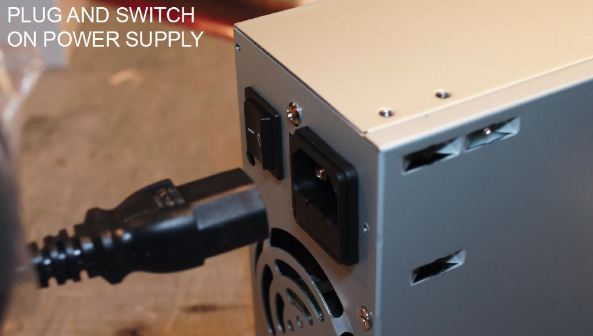
| If there is a red light on the switch at power inlet, check the side of the power supply inside the machine for a green light for the 5V line - this tells you that power is getting to the power supply so both the power inlet and the yellow power distribution board are OK (no fuses blown) |
| If there is no green light on power supply, check the screw out fuse on power inlet at back (or underneath and on top) of machine - if it is obviously blown replace with a 10A (not 3A!!!) fuse |
| If you are not sure if fuse is blown at back, plug the cord directly into the end plug on the yellow power distribution board. This will bypass the power inlet - there is only one plug that you can plug power into - the other three are power out |
| Try pushing all plugs into the Power Distribution Board |
| If this bypassing the power inlet plug works, and the machine starts it means the problem is in the power inlet, most likely the fuse |
| If bypassing the power inlet plug doesn't work, check the fuse in the power distribution board. This is a 10A 20mm fuse the same as the one on the back (or underneath). When you slide out the fuse area, the top fuse compartment is spare, the bottom is the actual fuse. |
| Keep in mind that the lights in the top of the machine run directly from the power distribution board. If the lights are working but other parts of the machine are not, it means both the power inlet and power distribution board are OK - the problem is likely to be in the power supply. |
| You should have a spare power supply - try bypassing the existing one rather than completely unscrewing it. If it solves the problem, unscrew it and replace. |
| On the power supply there are 4 different voltages. It's possible one could work while others don't. |
| Check the plugs around the perimeter of the PCB board. Each plug supplies power to various parts of the machine. It's possible one could be loose. |
| It's possible the PCB board may be faulty - try swapping it over. |